Build it once. Sell it every month.
Make one starting site, or pick one of ours. Every client who buys from your storefront gets their own copy in minutes, under your name, and pays you every month. We host every site, back it up and keep it safe.
Selling with AnyPress in one look.
- What you sell
- Websites as a monthly service: Website, Bookings, Online store, Community & courses and Everything, each in Small, Medium and Large.
- What you charge
- Whatever you like, monthly or yearly. Clients pay you, into your own payment account.
- What a site costs you
- Our list price for each live site, from $12 a month. 10 to 30% off every site once you have 3 or more.
- Your storefront
- Free. A shop on your own domain, with your name, logo, prices and emails.
- What we do
- Build every site, host it, save a copy every night, apply security fixes and send its email.
- What you do
- Find clients and look after them, the way you do today. They never see AnyPress.
- How fast
- A paid order becomes a working site in minutes. Nobody has to press a button.
- How to start
- Apply in two minutes. We read every application and email you back. There's no minimum.
Selling websites shouldn't mean running a hosting company.
Made forFreelance web designersSmall web design studiosMarketing consultantsChambers selling to membersAnyone whose clients ask for a website
- the problem
You get paid once, then start again at zero
You build a site, send the invoice, and next month you need a new project to get paid.
how AnyPress fixes itWebsites become a monthly service
Every client pays you each month, so each new one adds to what comes in. See a year of it.
- the problem
Building the same site again and again
Install WordPress, add the theme and plugins, set up email, connect the domain. For every client.
how AnyPress fixes itBuild it once, sell it every time
Make your starting site once, or use one of ours. Every order is a copy of it, ready in minutes.
- the problem
Hosting every client is a second job
A hosting account, a login, a renewal and a bill for every client, and you're the one they call.
how AnyPress fixes itEvery client under one login
Each order becomes its own website on our servers, and every one of them is in one list on your dashboard.
- the problem
Upkeep eats your weekends
Security fixes, backups and the odd emergency, for every site you've ever built.
how AnyPress fixes itWe look after every site
Security fixes applied for you, a copy saved every night and restored in one click, and the padlock on every site.
- the problem
Big hosts put their name on everything
Your clients see someone else's brand, and it's easy for them to go straight to the host.
how AnyPress fixes itYour name, not ours
Your storefront, your domain, your prices and emails from your name. Your clients never see AnyPress.
Watch it work.
Short videos of the real storefront and dashboard: a client buys a website, gets it, and you look after it.
Your dashboard.
Every client and every site in one place, at app.anypress.io. You and your team sign in with a link we email you.
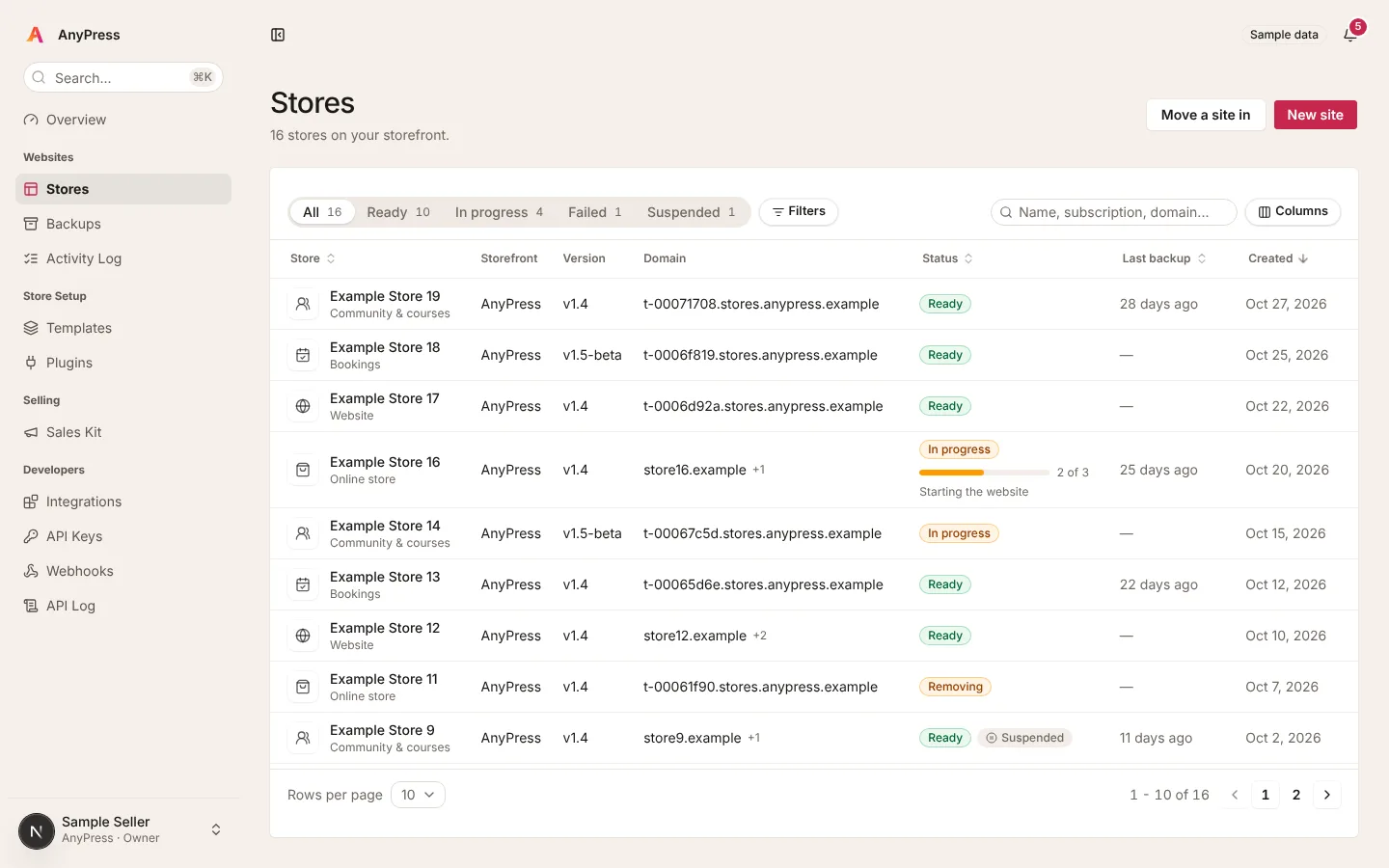
Every client's site in one list
- See which sites are ready, being built, failed or suspended, and when each was last backed up.
- Open any site, log in to its WordPress with one click, connect its domain or restore a backup.
- Start a new site by hand, or move a client's existing site in, from the top of the page.
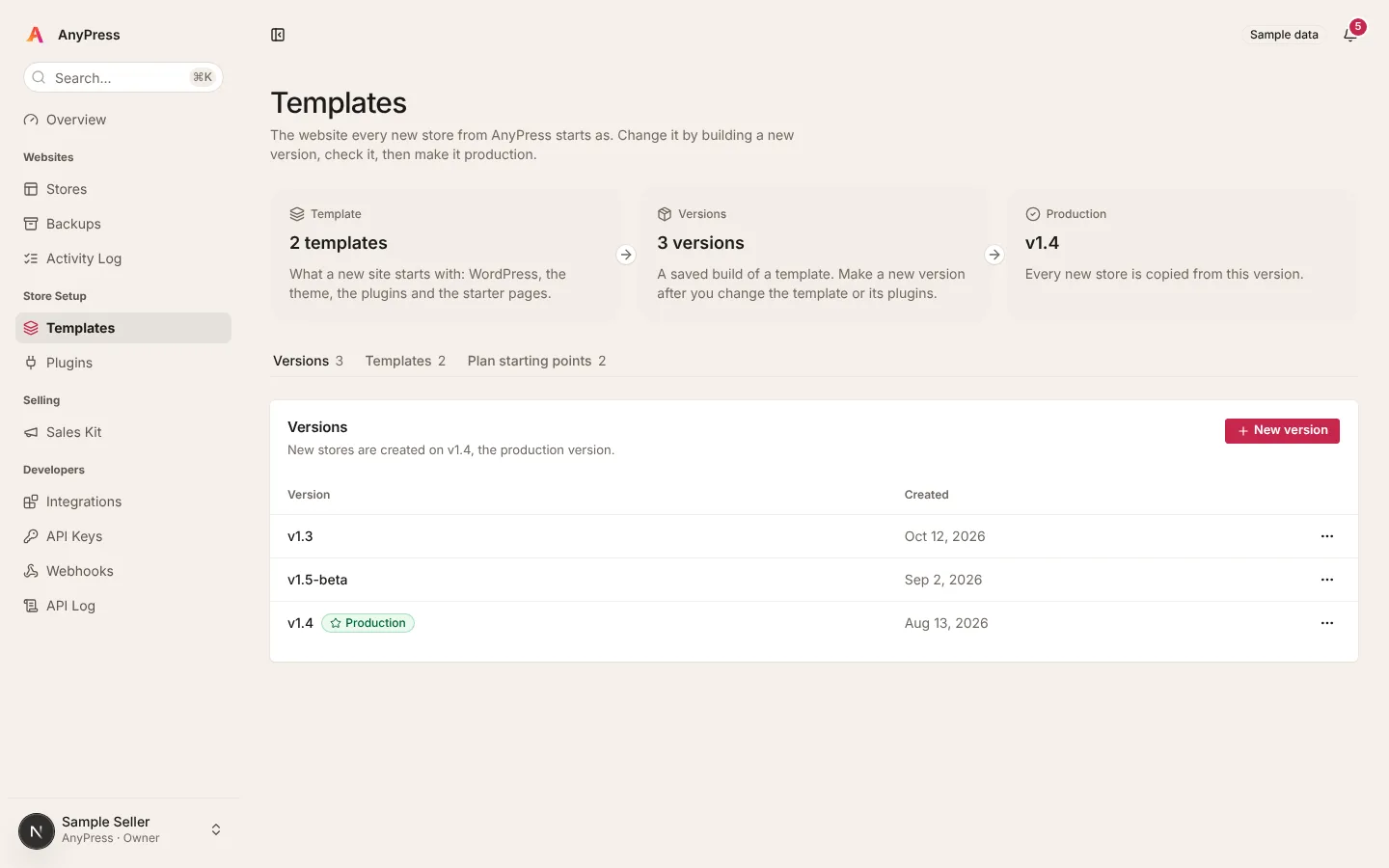
Change your starting site safely
- Your starting site is what every new order gets: WordPress, the theme, your plugins and your pages.
- Changed something? Save it as a new version and check it before any client gets it.
- Choose which version new orders are copied from. Older versions stay in the list if you want to go back.
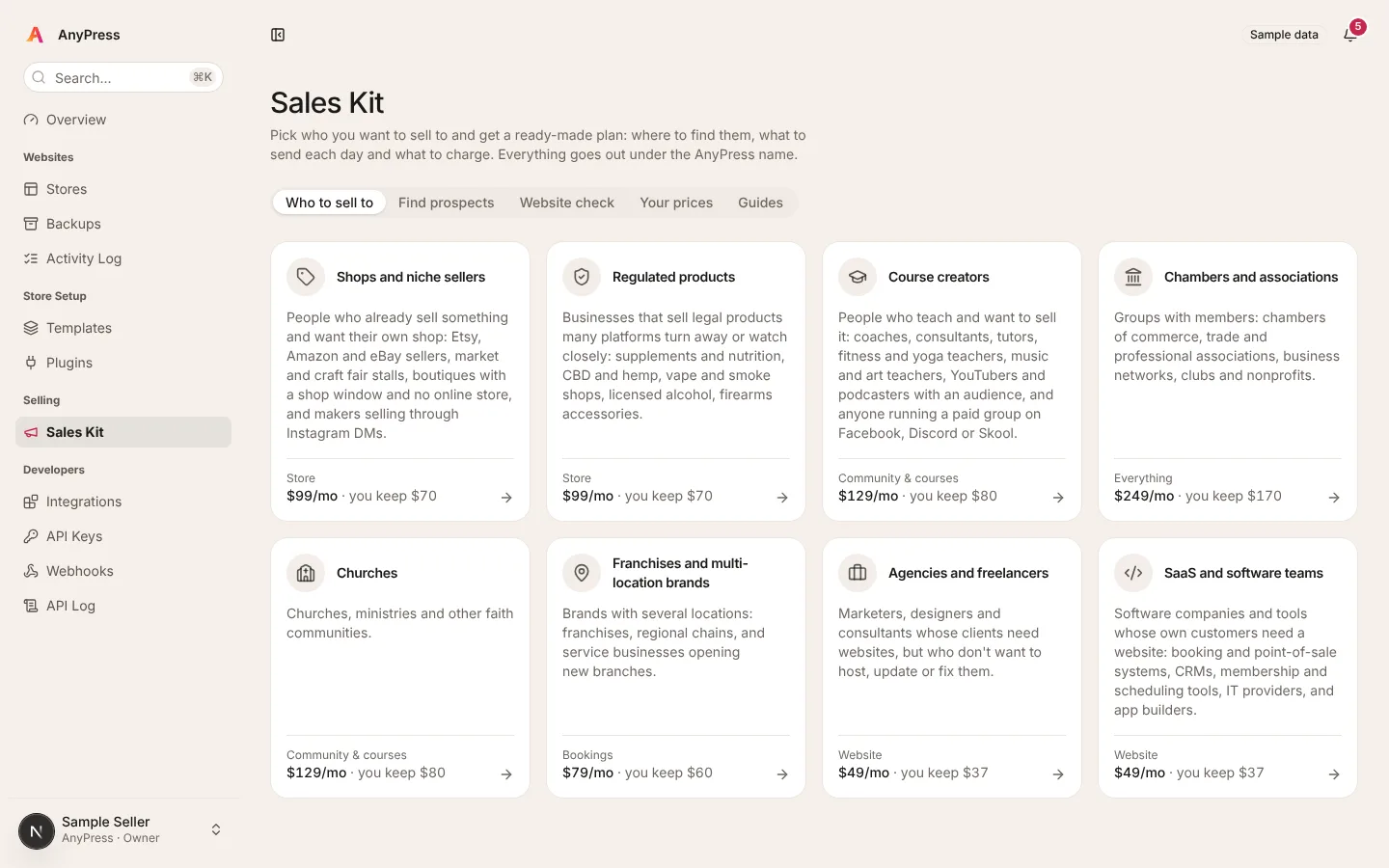
Help finding clients, built in
- Pick who you want to sell to, from shops and course creators to churches and franchises, and get a day-by-day plan with the messages to send.
- Find businesses near you, check their current website, and print an offer sheet and a short deck.
- Everything goes out under your name, at your prices, and shows what you keep from each sale.
Sell our ready-built sites, or sites you build yourself.
Your storefront sells whatever WordPress site you want to sell. Each order becomes its own copy, and we host and look after every one.
Start from ours
Sell the five ready-built sites as they are, with every tool already set up.
Add any free plugin
Search the WordPress plugin directory from your dashboard and pick which of your sites get each one.
Bring your premium plugins
Upload the paid plugins you already use, with your licence key, and every new site gets them ready to go.
Or upload a whole site
Built a site you love? Upload it as your starting site, with its theme, pages and plugins. Every order is a copy.
A few kinds of plugin can't be added because the hosting already does their job: page caching, backups, email sending, file managers and server firewalls.
A year of selling one kind of site.
Say you sell Small Website sites at $49 a month and win a few clients a month. Your cost per site drops as you pass 3, 10 and 25 live sites.
| A year of selling Website sites | Live sites | Your clients pay you | You pay us | You keep each month |
|---|---|---|---|---|
| Month 1 | 1 | $49 | $12 each | $37 |
| Month 2 | 3 | $147 | $10.80 each | $114.60 |
| Month 4 | 6 | $294 | $10.80 each | $229.20 |
| Month 6 | 10 | $490 | $9.60 each | $394 |
| Month 9 | 18 | $882 | $9.60 each | $709.20 |
| Month 12 | 25 | $1,225 | $8.40 each | $1,015 |
$49 is only an example: you set your own price. Sites move to a new saving at their next renewal, so a month can be a little higher while they catch up. Try your own numbers.
You run the business. We run the sites.
You control
- Your brandYour name, logo and domain on the storefront and every email. AnyPress stays in the background.
- Your pricesCharge whatever you like, monthly or yearly. Your clients never see our prices.
- Your payment accountClients pay you directly. You keep the relationship and the money.
- Your starting sitesSell our ready-built sites, or your own with any plugins you like, premium ones included.
- Your teamInvite the people who help you, and choose who can change things and who can only look.
We handle
- Building every siteEach order becomes its own WordPress with its own database, in minutes.
- Keeping them runningSecurity fixes, the padlock, and every site walled off from the others.
- Nightly copiesEvery site is saved each night, away from the server, and we test restoring them every day.
- Email that arrivesEach site sends from its own address, with sending set up for you.
- Checking every updateNew versions of WordPress, our theme and the plugins we include are tried on every kind of site before we use them.
Bring the sites you already look after.
Move each client's site over at your own pace. Their old site keeps running, untouched, until you switch.
- 1. Get a tokenChoose Move a site in on your dashboard. We set up the new site and give you its token.
- 2. Add ReprintInstall Reprint, WordPress's own free moving plugin, on the client's current site and paste the token in.
- 3. We copy it acrossThe whole site comes straight from the old host: pages, products, orders, theme, plugins and photos.
- 4. Check it, then go liveLook it over on its new address, copy again to catch anything new, then point the domain at it.
On WooCommerce, LearnDash, BuddyPress or another plugin? Each site can switch those to the Fluent plugins in a few clicks. What can be switched.
What could you earn?
Pick seller or reseller, then move the sliders. As a seller your price per site drops as you sell more; as a reseller every site is 40% off from the first.
$394 / month
$39.40 on each site, $4,728 a year.
- 10 clients pay you $49 each
- $490
- You pay AnyPress $9.60 a site$12 list, less 20% volume saving
- −$96
- You keep each month
- $394
Reach 25 sites and every site costs 30% less.
| You pay a site | You keep a month | |
|---|---|---|
| Seller | $9.60 | $394 |
| Reseller | $7.20 | $418 |
US dollars, before your payment company's fees and taxes. You set your own prices and your clients pay you directly; we build, host and look after every site. Sellers' savings count all their live sites. Resellers are for running several brands, see how they differ. Only want to recommend us? Affiliates earn 30% of a new customer's first payment, see affiliates.
The more sites you sell, the less each one costs.
Counted across all your live sites. When you reach a new level, your other sites move to it at their next renewal.
- 0%1 to 2 sites
- 10% off3 to 9 sites
- 20% off10 to 24 sites
- 30% off25+ sites
Seller or reseller?
One business name is a seller. More than one is a reseller.
Seller
One storefront with your name on it. Pay for each site at our list price, with the volume savings above. Most people start here.
- Freelance designers
- Local web design studios
- Chambers selling to members
Reseller
Several storefronts under one login, 40% off every site on one monthly bill, and partner keys so your developers can create sites with code.
- Studios with several brands
- Franchise offices
- Software companies
Questions sellers ask
Do my clients see AnyPress?
How many sites do I need to start?
How fast is a client's site ready?
Can I bring sites I already look after?
Do I have to create each client's site by hand?
What if I change my starting site later?
Who supports my clients?
What does the storefront cost?
I run several brands. Is this for me?
Who do I ask?
The profit calculator for selling websites
How the numbers work, and what your price leaves you each month. Read it now, no sign-up needed.
Read the guide →Want tips by email?
A few short emails about selling websites as a monthly service.
Sell your first website this month.
Tell us about your business and who you build for. It takes two minutes, and we read every application and email you back.